Features
Vincent turns locally installed coding agents into managed, repeatable workloads. Your repositories, credentials, worktrees, transcripts, and task state stay on your machine; vincent provides the control plane around them.
At a glance
| Area | Highlights |
|---|---|
| Orchestration | Durable daemon, priority queue, global and per-project concurrency, per-user service installation |
| Git isolation | One worktree and branch per task, configurable branch names, safe archive cleanup |
| Chats | Conversations with an agent in their own worktree and branch — or in a stopped task’s, holding the task still while you talk — continued through the agent CLI’s own session, with transcripts and cost |
| Workflows | Validated YAML, templates, declared task fields, checks, retries, timeouts, platform restrictions |
| Control flow | Parallel groups, isolated fan-out and merge, conditions, loops, breaks, reusable workflow includes |
| Agents | Claude Code, Codex, and Cursor; per-workflow, per-step, and per-task selection |
| Human oversight | Approval gates, mid-run answers where supported, blocked-step recovery, edit-and-retry, ad-hoc repair agents, a chat in a stopped task’s worktree, follow-up runs on finished tasks, a notify hook that reaches you with no client open |
| Visibility | Grouped task board, live output, durable transcripts, metrics, file-grouped diffs, workflow graph |
| GitHub | Create a task from an issue or a pull request, prefilled and editable — a pull-request task runs on that pull request’s head branch; issue details in templates; a project’s pull requests, each linked to the task whose branch it came from, with that task’s own tab carrying its live CI checks; and open a pull request for a task — push its branch and create the PR from inside vincent — then merge, close, reopen, comment on or re-run its failed checks from the task’s Pull Request tab or the CLI, each written to GitHub only when you ask. No stored credential |
| Event triggers | Start or act on tasks from a polled command, GitHub issue and pull-request changes, a signed push, or a cron or interval schedule; off twice by default, proposed paused and restricted, deduplicated and rate-limited, with a delivery ledger and dry runs; built-in workflows that write triggers and never switch one on |
| Integration | Full CLI, JSON output, stable exit codes, localhost REST API, durable state SSE and live output streams |
| Operations | Automatic usage-limit waits, one-command diagnostics, configuration editing from the TUI and CLI, orphan cleanup, database integrity checks, backup and restore, scheduled backups with retention |
| Platforms | Windows, macOS, and Linux; Homebrew, a universal macOS .pkg, Scoop, mise, deb/rpm, and archives; WinGet submitted, pending Microsoft review |
Orchestrate work instead of terminals
The daemon owns task state, agent processes, workflow execution, scheduling,
and git worktrees. The TUI and CLI are clients, so closing either does not stop
the work behind it. vincent service install can start the daemon with your
login on launchd, systemd, or Windows Task Scheduler.
The scheduler admits work by priority and creation time while enforcing a global concurrency cap and an optional cap for each project. A task waiting at a human gate, blocked step, or fan-out join releases its slot instead of starving other work.
A task can also be created held: it waits paused on the board, with no
worktree and no agent started, until you resume it. Two more
create-time limits
tighten one task without editing its workflow — restricted runs every agent
step in restricted mode, even one written full-auto, and the task’s own
max_task_cost_usd is a spend cap that can tighten the global one but never
lift it. vincent task add takes all three; the new-task form offers the held
create.
Each task runs in a dedicated git worktree on its own branch. Parallel tasks do not collide with one another, and vincent leaves your own checkout alone unless you point a task at the branch it holds. The branch convention is configurable globally, per project, or for one task.
Work on a branch you already have, too. vincent task add --branch NAME
--existing-branch (and vincent chat start --branch NAME --existing-branch)
runs on an existing branch instead of cutting one: it is fast-forwarded from
its own upstream if it is behind, left where it is if it is ahead, and refuses
without moving anything if it has diverged. If that branch is the one you have
checked out, the task runs right there in your own working copy rather than
making you move off it — and archiving it removes nothing, because vincent
deletes only a branch it cut itself. One directory has at most one owner: a
second task waits queued until the first is archived. In the TUI the same
choice is a list: the new-task and new-chat forms’ branch rows offer the
repository’s own branches, marked with the ones your checkout or another
worktree already holds; on the new-task form, typing a name the list does not
carry still cuts a new branch under it. See
running a task on a branch that already exists
and the new-task form.
Talk to an agent without a workflow
Not every question is a task. A chat is a titled conversation with an agent,
scoped to a project, that gets its own worktree and vincent/{id}-{slug} branch
exactly as a task does — so you can ask about a repository, read the answer, and
ask the next question with the first still in context.
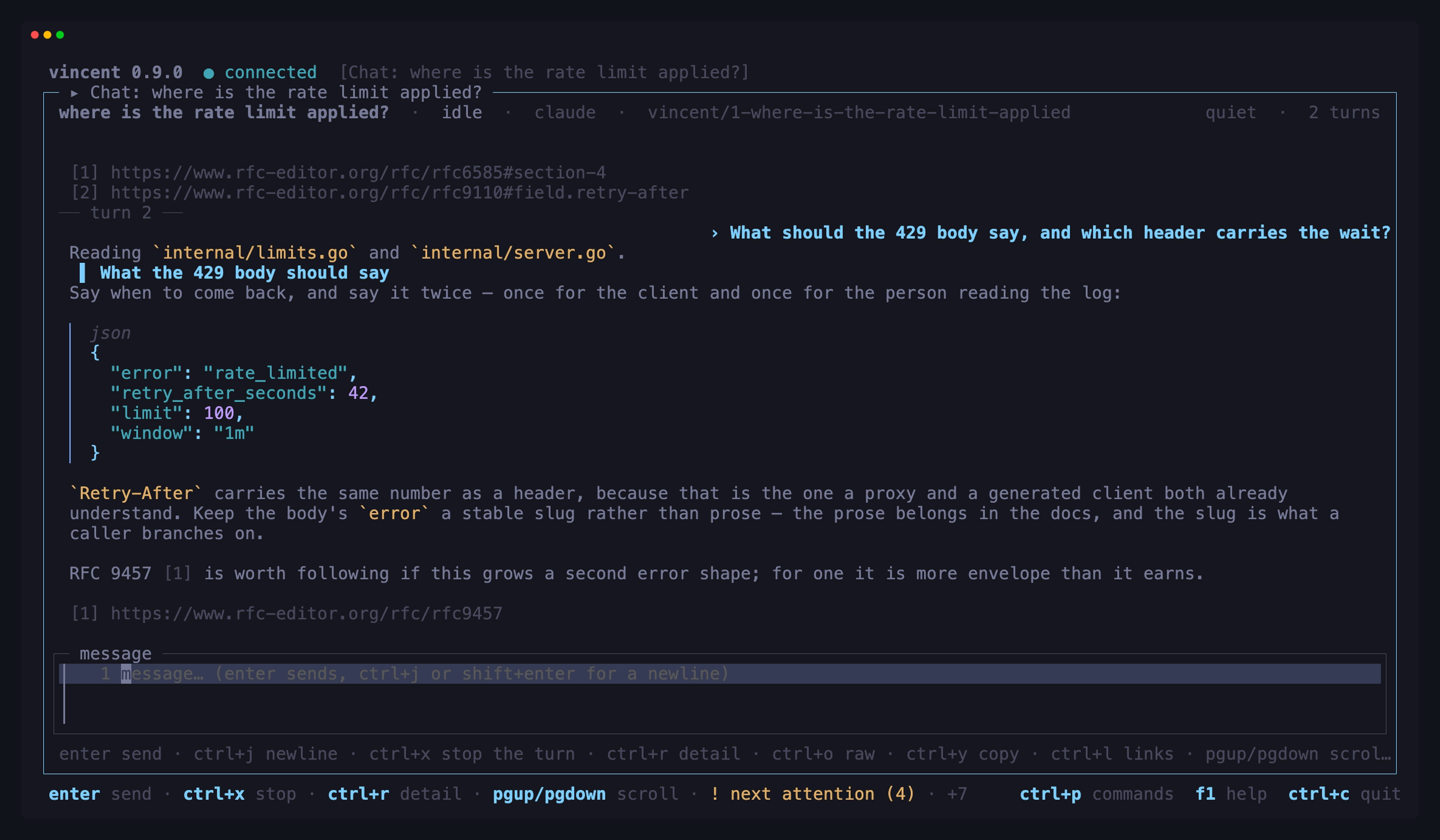
Continuity is the agent CLI resuming its own session, not vincent replaying
the conversation into the next prompt. That means only an adapter that can
resume may hold a chat — all three of claude, codex and cursor can, each
pinned to a captured fixture from a named CLI build. One that could not would be
refused at creation rather than having continuity faked for it.
A chat is real work, not a scratchpad. The agent may commit to the chat’s branch, every turn records its tokens, cost and duration, and each turn keeps its own transcript — the accounting a conversation held in a terminal never leaves behind. Archiving a chat cleans up its worktree, and an empty branch with it, the way archiving a task does.
And when an exploration turns out to be the start of real work, hand the chat
off to a task. The task adopts the chat’s worktree, branch, base branch and
base SHA exactly as they are — no copy, no rename, no hidden commit, so
committed and uncommitted changes are simply already there when the task’s
first step runs. The chat ends, linked to the task; the task owns the worktree
and branch from then on. ctrl+t in the chat workspace,
vincent chat handoff, or
POST /v1/chats/{id}/handoff.
It works the other way round too: chat with a stopped task. When a task stops for you — blocked on a failing step, waiting at a gate, done, or aborted — open a chat on the task and talk the fix through in the task’s own worktree, on its own branch. The agent starts with what the task already knows: its title, description and fields, and then what the stop is about — a blocked step’s failure with the tail of its transcript, the gate’s instructions, or the last step’s summary. Where a repair is one prompt and one run, this is a conversation: look, try, check, adjust.
While that chat is open, the task is locked. Nothing moves it and nothing
races it — retry, skip, approve and every other action are refused until
the chat is closed, even between turns, and cancel is the one action that
still works. Closing the chat changes no file and no branch, so you read the
diff and then decide what the task does next. A later stop can have a new chat,
and the closed ones stay listed on the task as its history. On a task that runs
in a container, the chat’s turns run in that container too. The conversation’s
tokens and cost stay on the chat rather than counting toward the task’s
max_task_cost_usd. Open one with
vincent task chat or
POST /v1/tasks/{id}/chat, close it with
vincent chat close, or do both from the
TUI — see Task lifecycle.
Chats never appear on the task board and never enter the scheduler. A turn
starts the moment you send it, bounded only by its own
max_parallel_chats cap — over
that it is refused immediately rather than queued behind batch work, which is
the wait a chat exists to avoid.
A chat can also tell you which skills its agent would load in its own
worktree, and the exact text that invokes one —
vincent chat skills or
GET /v1/chats/{id}/skills. The list is the agent CLI’s own, asked for rather
than guessed at: an agent that cannot report one says so instead. In the chat
workspace it is a key away: tab opens the list above the composer, type
to filter it, and the row you take is written into your message as the exact
invocation the agent named — with whatever you had already typed becoming its
arguments. Browsing never touches the draft, so esc leaves your message
exactly as you wrote it. The same list opens by itself when your message
starts typing the agent’s own invocation syntax, so writing /name and
picking from a list are one gesture rather than two. Typing @ and a
character lists the files that chat’s next turn could be pointed at
instead, and the row you take is written into the message as the exact text
that mentions that file — the agent’s own quoting included
(guide).
Drive one from the TUI’s own chats board and chat workspace
(guide), from
vincent chat, or over the
/v1/chats routes. A chat turn is bounded by the same
agent_timeout and input_timeout a workflow step is, so a conversation
nobody comes back to gives its slot up rather than holding it forever. No chat
route is exposed as an MCP tool.
Express the workflow the work needs
Workflows are reusable YAML files that reload when saved and can travel with a
repository under .vincent/workflows/. Strict validation catches unknown
fields and invalid combinations before a task starts.
Three step types perform work or wait for a person:
agentruns Claude Code, Codex, or Cursor with a rendered prompt.commandruns a deterministic shell command in the task worktree.manualcreates an explicit approval gate.
Six structural types compose those steps:
parallelruns independent sub-steps concurrently in one worktree.fan_outcreates child tasks with isolated branches and merges their results.conditionends a sequence early when a rendered condition is true.looprepeats a body by count or over a discovered list.breakexits a loop cleanly.includereuses another workflow inside the current one.
Prompts, commands, checks, and instructions use Go templates. A step can read
task and project data, declared task fields, loop context, and earlier step
results. Workflows can declare ordered inputs with labels, descriptions,
required flags, types, defaults, and validation patterns — including enum
fields whose values are published as a list, so the TUI offers a picker rather
than a text box. The TUI renders them before the task is submitted, while
additional ad hoc fields remain available.
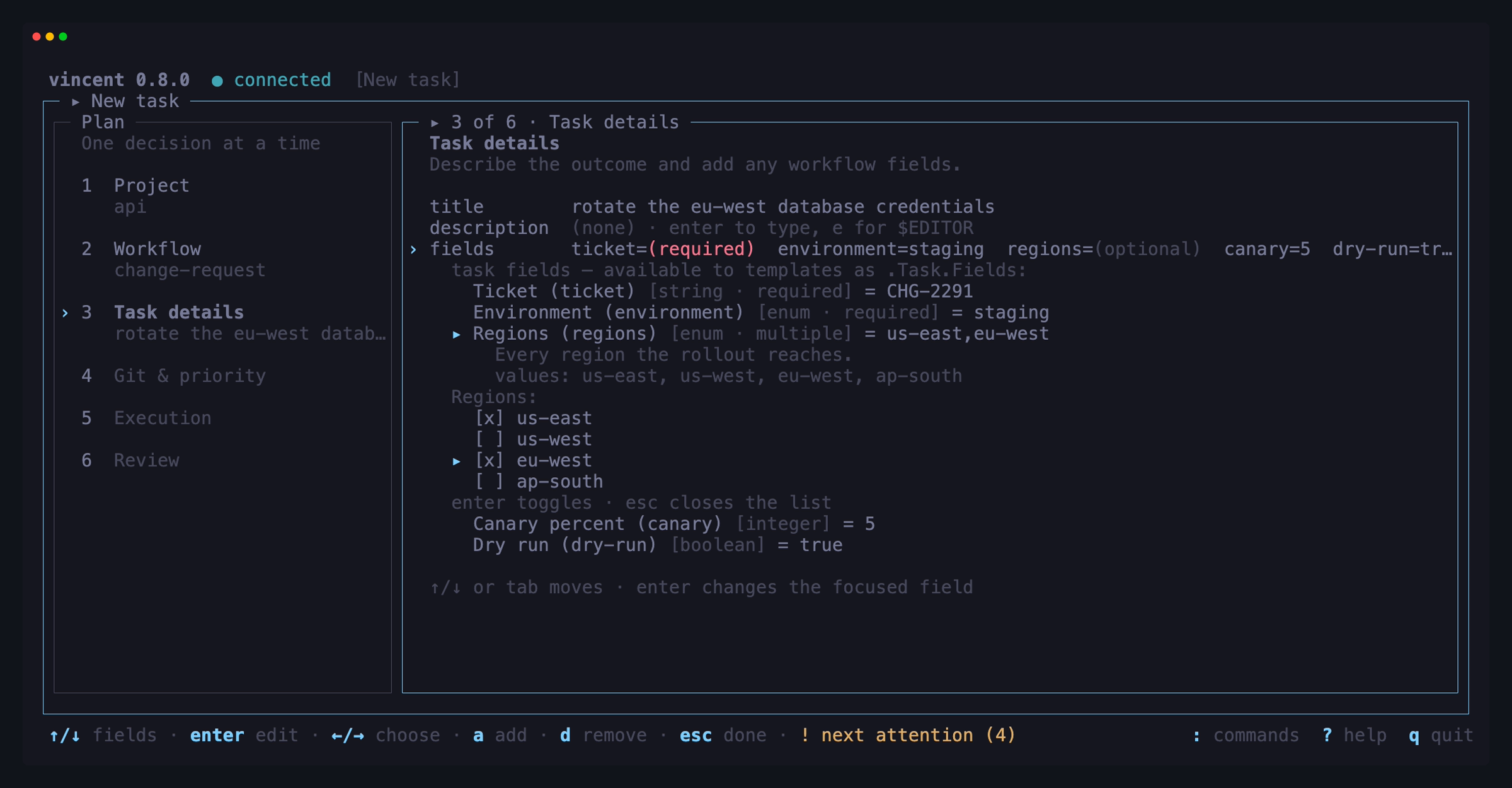
The workflow guide explains the patterns, and the workflow schema lists every field.
Verify outcomes and recover cleanly
An agent saying “done” is not the success condition. Agent and command steps
can carry a check command, and the step advances only when both its body and
its check succeed. A retry receives the actual failure, so the next attempt can
correct the work rather than guess what happened.
Timeouts are enforced, retry counts are bounded, and exhausted steps become
blocked instead of being silently skipped. From there a person can retry,
edit the step for this task and retry, skip it, or cancel the task.
Spend can be bounded as well. max_task_cost_usd blocks a task with
cost_limit once its cost across every attempt passes a ceiling you set. It is
off by default, it counts one task at a time, and it only sees the agents that
report cost at all. max_tree_cost_usd is the same kind of ceiling for a whole
fan-out tree: the parent and every lane below it share one budget, and the task
whose attempt crosses it blocks with tree_cost_limit. A parent’s detail shows
what its lanes have spent.
When the problem is in the worktree rather than in the step, a blocked task can
also be repaired: one throwaway agent, prompted by you and handed the
blocked step’s failure context, runs in that task’s existing worktree and
branch. It changes files and nothing else — the task returns to blocked at the
same step with the same reason, so you read the diff and then decide. The repair
is recorded as its own step run with its own transcript and cost, and does not
consume the blocked step’s retries. When the fix needs more than one prompt,
chat with the stopped task instead: a
whole conversation in the same worktree, with the task held still until you
close it.
A finished task keeps its worktree, its branch and its commits until you archive
it, and that window is where the last mile of real work lives — a branch that
needs rebasing onto a main that moved, one more commit a review asked for, a
stray file to drop. A follow-up run does that work inside vincent: give a
done or aborted task an agent prompt, a shell command, or the name of a
workflow, and it runs on that task’s own branch in that task’s own worktree,
recorded in its own ledger with a transcript and cost accounting. It is
repeatable, and it never changes the task’s verdict — a done task comes back
done and an aborted one comes back aborted. It was the first human action to
get a command line, because “rebase these six finished branches” is a batch;
every other one — approve, reject, retry, repair, skip, pause, resume, answer,
archive — is a subcommand now too, so a board full of blocked tasks can be
cleared from a shell loop.
Archiving keeps the history. Archived boards — one for tasks, one for chats,
both reached from the command palette — are where it is read back: the live
boards you already know, listing what is archived instead of what is running,
newest-archived first, in pages and inside a date window. Opening a row from
there opens its full workspace, read-only because an archived task offers no
actions rather than because a flag says so. It is also the one place anything is
permanently deleted: D (or vincent task delete / vincent chat delete)
removes the row, its attempts and its transcripts for good, optionally with its
branch — never a branch carrying commits past its base, which stays vincent’s
standing rule wherever it is asked. A delete refuses rather than cascading:
a fan-out parent whose lanes still exist, or a task a handed-off chat points
at, is named as what is holding on.
Every state transition is persisted before execution. If the daemon dies mid-step, restart recovery finalizes the interrupted attempt, verifies and stops orphan processes, and reruns the step without charging it as a failed retry. Every attempt also keeps a durable JSONL transcript.
When Claude Code reports a usage limit, vincent treats it as a temporary wait
instead of a failure: the task returns to the queue without consuming a retry or
slot, shows its next admission time, and starts again when the window reopens.
The other tasks on that agent wait for the same window too, without starting a
process just to hit the limit again.
usage_limit_auto_continue decides whether that happens unattended — wait
always, wait only when the CLI actually named a reset time, or stop and tell
you. Stopping costs nothing: the attempt still consumes no retry, so a retry
once the window reopens starts with a full budget.
A step that fails on something transient can borrow the same wait. Give it
retry_backoff: 30s and its retry is paced rather than immediate: the task
returns to the queue, gives up its slot so other work carries on, shows when it
will resume, and re-runs the step by itself. Unlike a usage limit the attempt
still counts against max_retries — the wait decides when a retry happens, not
whether there is one.
Keep people in the loop
Human oversight is part of the workflow instead of an informal terminal habit:
- Add
manualsteps before publishing, merging, deployment, or any other irreversible boundary. - Review the task’s file-grouped git diff before approving it.
- Answer a supported agent’s structured question while its session remains alive, or require that capability when the workflow depends on it.
- Pause active work at a step boundary, change task priority, and recover a blocked step without discarding its branch or transcript.
- Send a one-off repair agent into a blocked task’s worktree when the fix is a file change, and still decide yourself whether the step then re-runs.
- Follow a finished task up with one more agent run, shell command or workflow in its existing worktree, as many times as it takes, before archiving it.
- Use bulk selection to act on several eligible tasks while refusals remain selected for follow-up.
-
Let a long-running step say what it is doing:
vincent status "<message>"from inside an agent or command step reports a line that shows live on the board and stays on the finished attempt as the step’s own account of how it went. It is opt-in per workflow — vincent never asks an agent for it. - Be told when you are needed, with nothing open. Point
notify.commandat a script and the daemon runs it whenever a task enters a state you listed —blocked,awaiting_gate,awaiting_input,done— writing a JSON envelope with the task, the transition, the reason and the agent’s question to its standard input. It composes with whatever you already use:terminal-notifier,notify-send,msg, a Slackcurl, a file drop. That is the point of walking away: the daemon is designed to run with no client attached, and this is how it says it needs you. Seenotify.
The daemon computes the actions valid in each state and sends that list to every client, so the TUI, CLI, and API agree on what can happen next. See the task lifecycle for the complete model.
Operate from a purpose-built TUI
Running vincent opens a Bubble Tea interface for active agent workloads:
- A filterable, grouped task board shows state, current step, elapsed time, reported cost, and — on a wide terminal — the step’s own status message. Groups fold away, and a folded one still carries its task count and its needs-attention badge.
- Task detail is a full-screen workspace with Steps & Attempts, Task Details, Output, Diff, Workflow, and Step Details tabs, plus a Pull Request tab on a task that has one linked; each tab uses the whole view.
- Step Details answers what an attempt was actually given: the rendered prompt
or shell script it was handed rather than the workflow’s template, what an
if:guard rendered to, which level supplied its agent, model and effort, and the permission mode, timeouts, shell and working directory it ran under — all recorded when it ran, so they still say what happened after you edit the config or patch the task. - A fan-out is something you can watch.
Lhangs a fan-out parent’s lanes under it as indented board rows in every state it passes through — without putting them in any count — one key opens the lane you are pointing at and another opens a lane’s parent, the Output pane cycles the lanes’ live output, the Diff tab groupslane › fileso you can see which lane wrote what, and a failed join names the lane, its child task and that lane’s own block reason. The parent’s own step timeline carries the fan-out for as long as its lanes run, annotated with what the subtree is doing —2 blocked,3/5 done. - The Output tab and the chat workspace share one renderer, and one verbosity
level. Assistant prose is rendered as Markdown — headings, lists, blockquotes,
inline and fenced code, rules, tables, links and images become terminal
structure instead of literal syntax — while reasoning, tool calls, command
output and errors stay literal behind their own gutter marks. A table is laid
out to the pane and degrades to stacked
column: valuerecords rather than being clipped; a link’s destination is printed in a numbered reference list, becomes a terminal hyperlink only for sanitized http(s) links when you opt in withtui.hyperlinks, and is opened by vincent only when you pick it from a link picker that shows the whole destination first and opens nothing buthttpandhttps; a fenced block shows its language and is tinted with styling only. Every marker is a glyph rather than a colour, so a monochrome terminal keeps every distinction, and the transcript on disk keeps the agent’s exact bytes. One key swaps the rendered view for the stored Markdown when a render surprises you, and another opens a picker that puts a message, its plain text, or a single fenced code block on the clipboard — built from the source, so the pane’s width is never baked into what you paste. Consecutive assistant records are read as one message, so structure that an agent split across records renders whole, and a pane you have scrolled away from keeps its place across a resize, a level change, the raw toggle and output dropping off the front of the window. - Nothing waits in silence. While a chat turn or a step attempt is running, a
turning glyph and an elapsed clock —
⠋ working… 14s— say so above the chat composer, beside a running row on the chats board, and in the output pane’s title, for the whole time it runs rather than only until its first chunk arrives — which is what makes it useful at thequietlevel, where a tool-heavy turn renders nothing new for minutes.vincent chat senddraws the same indicator while it blocks, on stderr and never under--jsonor into a redirect. A screen with nothing running repaints no more often than it did before. - Guided task creation exposes project, workflow, declared fields, git and priority settings, agent overrides, and a final review stage.
- Project and workflow workspaces keep navigation visible beside contextual details on wider terminals and fall back to compact layouts when needed.
- Workflows are authored where they are listed: structured forms create, edit
and fork them without leaving the TUI. The forms are rendered from a schema
the daemon serves, so a field the step you are editing cannot carry is one you
are never offered, and saving preserves the comments and key order of the file
you did not touch.
$EDITORis still one key away for anything the forms cannot load. - A pull-requests screen lists what is open across every GitHub-based project at once, with the task claiming each one, and is where a link is made or removed by hand. It is offered only when at least one project qualifies.
- The workflow graph visualizes parallel groups, fan-out lanes and merges,
the
needs:edges between lanes and the waves they run in, conditions, loops, guards, checks, and nested includes — and, on a task’s own Workflow tab, what each step of that task did on it, live.enteropens any node in full: its prompt orrun:body, and the values it inherits from the file’sdefaultsblock. - Keys are yours to move.
tui.keysinconfig.yamlrebinds an operation — refresh, approve, the palette, quit and the rest of the shared vocabulary — on every screen that has it, and the footer, the palette and?show the key in force. The daemon checks a keymap against the same rules the shipped keys obey and refuses one that would give a key two meanings or take a key a text field types, so a rebinding never breaks a screen you did not look at.
The screenshots in the main README are real renders using representative workloads. Using the TUI documents every view and key.
Bring the agent you already use
Vincent invokes locally installed and authenticated CLIs; it stores no agent API keys or login credentials.
| Agent | What vincent integrates |
|---|---|
| Claude Code | Model and effort discovery, usage and cost reporting, restricted mode, mid-run questions, and the fullest account of its own run — the working directory and tool set it was given, its duration, turns, cache split and refused tool calls, the lines each edit changed with its hunks at verbose, and its subagents’ work nested in the output pane rather than read as its own. Its remaining usage quota reaches vincent when you let it draw your status line |
| Codex | Headless execution, restricted mode, session resume so it can hold a chat, its remaining usage quota answered on request over its app-server, and its running to-do list, command output and full token usage in the output pane; no mid-run input or cost reported by the CLI |
| Cursor | Headless execution and model discovery, and the working directory, duration and cache split of its run in the output pane; reasoning effort is part of the model id, restricted mode is unavailable on Windows, and it has no usage-quota surface to report from |
Agent, model, effort, and permission settings resolve from step to task override to workflow default to adapter default. The TUI shows which level won, and free text remains available when a newly released model is not in a catalog yet. Read Agent CLIs for installation and capability details.
Run steps in a container
Point container.image at an image you already have and a task’s step processes
run inside one container, created with the task’s worktree and removed with it.
What that confines is the filesystem outside the worktree and the project
repository, the shell, and the tooling the image carries. Leave the key empty,
which is the default, and nothing changes: every step runs on the host exactly
as before.
That covers agent steps, command steps and every check:. The agent CLI
runs inside the container, and its transcript, token and cost records and exit
code are the same as on the host. Its ~/.claude, ~/.codex and ~/.cursor
are mounted in by default so it can log in, and vincent’s own tools still reach
it. Chats keep running on the host, except a chat opened on a containerized
task, whose turns run in that task’s container.
The image is yours and must already carry your agent CLI and git — vincent
builds, publishes and bundles nothing. The CLI is found on the image’s PATH,
so the host does not need it installed. The repository and the worktree are
mounted at their own absolute paths, so a path means the same thing inside and
out and workflow templates need no translation. A workflow can pin its own image
in defaults.container:.
macOS and Linux hosts only, and the container is a filesystem boundary rather
than a network or credential one — outbound traffic is open by default, and
mount_agent_config, on by default, puts your agent’s credentials inside it.
On macOS, claude keeps its login in the Keychain, so a containerized claude
step needs CLAUDE_CODE_OAUTH_TOKEN or ANTHROPIC_API_KEY in
environment. Read
the security model for what that means and
container for the knobs.
Script and integrate it
The TUI, command-line subcommands, and external integrations all use the same localhost API.
- Every subcommand supports
--jsonfor machine-readable output. - Stable exit codes distinguish a rejected request from an unavailable daemon.
- REST endpoints cover projects, workflows, tasks, actions, output, and diffs.
- Creating a task takes an optional idempotency key, so a create that loses its response can be re-sent without making a second task.
- Server-sent events provide durable state replay and live per-task output.
vincent workflow validateworks without a daemon or installed agent CLI, so it fits pre-commit hooks and CI.vincent workflow renderbelongs there too: it executes a workflow’s templates against a preview context, so a reference no task would satisfy is caught before a task is created.vincent task diffprints a task’s change as a patch that pipes straight intogit apply, split into one section per fan-out lane with--by lane, or as a per-file table of added and removed lines with--stat.vincent agentsshows each agent CLI’s version, whether vincent has tested that build, whether you are logged in, and its usage quota, and exits 0 whatever the adapters’ health so a script can read it.
Start with Scripting vincent, then use the complete HTTP API reference when you need direct integration.
Let an AI agent drive it
The daemon serves the Model Context Protocol on the same loopback listener, behind the same bearer token, so any MCP client gets the whole API as tools — with discovery, argument schemas and typed errors rather than hand-rolled curl.
- The tool surface is the route table, minus the routes an agent has no
business calling: stopping, backing up, garbage-collecting, repairing or
reconfiguring the daemon, editing its workflows or triggers, opening a pull
request, reporting a quota reading, deleting anything permanently, and
driving a chat. The configuration route is also the only tool whose body
differs from its route’s:
config_getmasksenvironment.set’s values andnotify.command’s argv, because a tool result lands in the model’s context and in the transcript. - One bounded
task_waitcall blocks until a task is done, aborted, archived, or waiting on a human — with a hard ceiling, so a call cannot hang. Step transitions stream as progress notifications, and the result is complete without them. - Your own agent steps get the same tools by default. A step can file
follow-up work, read a sibling lane’s transcript, or answer a gate, with
nothing to configure.
mcp.wire_steps: falseturns it off. - A chain of tasks created this way is bounded by
mcp.max_depthandmcp.max_tasks, because a step’s agent can create a task whose step runs an agent that creates a task.
See Driving vincent from an agent.
Start from a GitHub issue
On a project whose origin remote points at github.com, the new-task form
offers an issue row above the title. It opens the same type-to-filter picker the
project and workflow rows use, listing open issues newest first. Selecting one
fills in the title — prefixed #N, so the board row says which issue it is —
the body plus a GitHub issue #N: <url> link line, and any declared fields:
named exactly issue, labels, assignee, or milestone. Every value lands
in an ordinary editable row, so a guess can be corrected or cleared before the
task exists.
A declared issue field gets the issue number, which is how a command
step reads it: step bodies receive the environment of §8.5,
not the template context, so {{ index .Task.Fields "issue" }} is what puts the
number into a run: body.
Templates receive the issue as .Issue — number, title, body, URL, state,
labels, author, assignee, and milestone — zero-valued when nothing is linked, so
{{ if .Issue.Number }} lets one workflow serve both. The issue is fetched once
at creation and stored on the task, so runs stay reproducible and no step render
touches the network. Fan-out lanes inherit their parent’s issue.
vincent task add --github-issue 200 takes the same path as the form, with
explicit flags winning, and vincent github issues lists issues without the TUI.
Vincent stores no credential: it prefers your existing gh CLI and falls back to
GITHUB_TOKEN/GH_TOKEN from the daemon’s environment. Nothing about an issue
is ever written back — vincent writes to GitHub only when you ask it to open a
task’s pull request or act on one, below. When it is
unavailable the row does not appear, vincent doctor reports why, and
everything else is unaffected. Set github.enabled: false in config.yaml to
switch it off entirely.
See the new-task form, the
configuration reference, and the
workflow schema for .Issue.
Start work from an event
A trigger is a file under {config_dir}/triggers/ that turns an outside event
into vincent work, so a labelled issue, a review request, a red CI build or a
weekday morning can start a task without you opening the TUI. It reads events
from one of five sources: a command the daemon polls, a project’s GitHub
issues, its pull requests, a signed push to POST /v1/triggers/{id}/events,
or a schedule — a cron expression or a fixed interval, in the zone you name.
match:, if: and allowed_actors filter them, a dedupe_key makes each
event fire once, and limits.max_per_hour caps the rate. overrun: decides
what happens when the group a concurrency_key: names still has unfinished
work: fire anyway, skip the event, cancel what is running, or hold it until
the group empties.
A trigger that fires can create a task, follow up a finished one, retry a
blocked one, or cancel one, finding the task by its branch. By default it only
proposes: the task lands paused with its agent steps restricted, and you
start it with resume.
Triggers are off twice: a file needs its own enabled: true and
triggers.enabled in config.yaml. Turning one on seeds it, so events that
already existed never fire — and a schedule anchors its clock then, so the
first occurrence it fires is one that falls after your keypress. Every event
judged is recorded in a delivery ledger. vincent trigger test and the live
poll show what a trigger would do without writing anything. The TUI’s triggers
view, opened from the command palette, creates, edits and enables them and
shows each one’s ledger.
An agent can write triggers for you, and cannot switch one on. The
create-trigger built-in writes a new trigger for a project, and
update-triggers proposes improvements to a project’s existing triggers for you
to approve. Both install through vincent trigger apply, which refuses
enabled: true, on_fire: create and permission: workflow on any file it did
not already hold them on. The published vincent-triggers skill teaches the
same to an agent you talk to directly, and vincent trigger validate checks a
file with no daemon running.
See Event triggers and the security model.
Link a task to its pull request
Once a workflow has pushed a task’s branch and a pull request has been opened
from it, vincent finds it. Every
github.poll_interval — 5 minutes by
default — the daemon lists each GitHub-based project’s open pull requests
and links the ones whose head branch is a task’s own branch. It never overwrites
a link you made by hand, and a link you removed is never re-applied.
The TUI’s pull-requests screen shows every GitHub-based project’s listing at once and carries the two linking actions — link a pull request the head-branch rule missed, unlink one it got wrong — and a task’s own workspace shows its pull request beside its branch, on a Pull Request tab that adds one row per CI check on its head commit and carries a second copy of unlink.
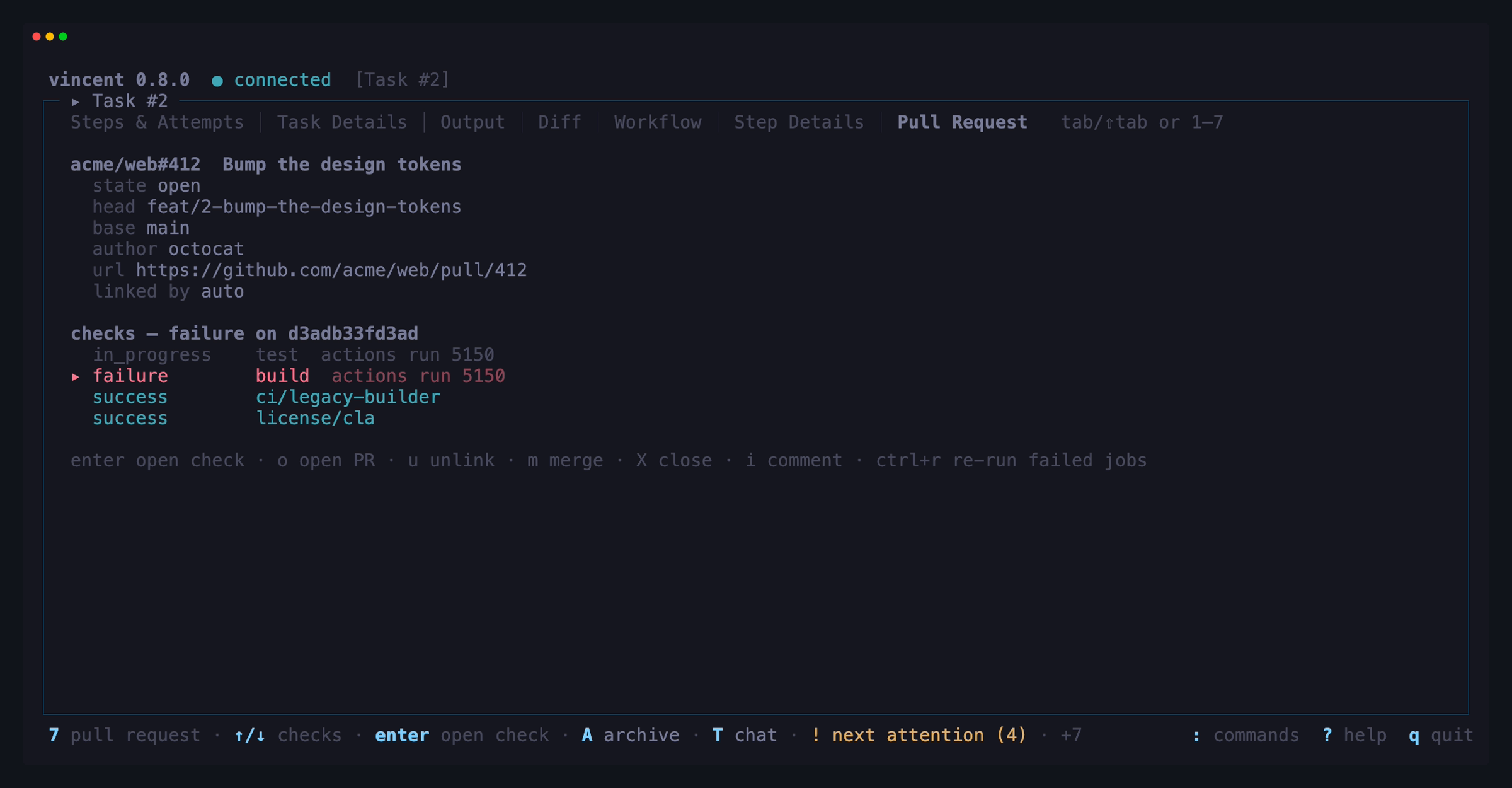
vincent github prs --project ID prints one project’s open pull requests with
the task each one belongs to, and vincent github pr link, pr unlink,
pr show and pr checks link, unlink, read and list the checks of one task’s
pull request without the TUI. Only the link is stored: a pull request’s title,
state, draft and merged status — and every check on it — are re-read every time
they are shown, which is what lets a task still name a pull request that has
since merged and dropped off the open listing.
Open a pull request
A task with a branch and no pull request can get one without leaving vincent.
Press P in the task workspace — or P on the pull-requests screen, which
offers a picker of every task that has a branch and no pull request — and a form
opens with the title, the body and a draft / ready toggle, all editable
first. The body is prefilled from the task’s description, plus Closes #N when
the task came from an issue. ctrl+s pushes the branch to origin and opens
the pull request; the link appears immediately.
vincent github pr create --task ID --title TITLE [--draft] does the same
thing without the TUI.
Opening one is a write to GitHub, and so are the five things you can then do to
a task’s linked pull request from its Pull Request tab or the CLI — merge,
close, reopen, comment, and re-run failed Actions jobs (see the
task workspace and
vincent github pr merge). Each
happens only when you ask for it — on the tab, each asks first — and
github.enabled turns every one of them
off along with every read. Agents cannot reach them: none is an MCP tool, and an
agent that wants a pull request runs git push and gh pr create in its own
worktree, as it always could.
Two things it will not do. It never force-pushes — a diverged, protected or rejected push creates no pull request and changes nothing on the remote, because your branch may hold commits nobody has pushed and throwing them away quietly is not vincent’s call. And it pushes committed work only: anything uncommitted in the task’s worktree is not in the pull request, which the form says before you confirm.
If there is no credential with write scope, or GitHub refuses the create, the branch is still pushed and vincent falls back to opening GitHub’s own “open a pull request” page in your browser — the same hand-off it always did, except that the branch behind it now exists.
Run a pull request
The other direction: turn a pull request into a task. Press a on the
pull-requests screen, or run
vincent task add --project ID --github-pull N. The new-task form opens
prefilled with the pull request’s title and body, editable like any other draft,
and the task that comes out runs on that pull request’s head branch — its
worktree is that branch checked out with an upstream, so when a workflow pushes,
the work lands on the pull request. Addressing review, fixing CI and extending
somebody’s branch stop being out-of-band git.
s cycles the listing between open, closed and all, so a merged pull request you
want to redo is reachable. A workflow field declared pull receives the number,
which is how a run: step acts on the pull request. A fork works too: its head
is fetched and checked out, and vincent says up front that nothing can be pushed
back to it.
Two branch rules follow from the task not owning its branch. If you already have that branch locally, vincent fast-forwards it, and refuses rather than discarding anything when it has diverged or is checked out somewhere else. And archiving such a task never deletes the branch — local or remote — because vincent did not cut it.
This is one of two things vincent does on the network without being asked — the
other is the release check under Run it on your platform
— and it has its own switch: github.poll_interval: 0 stops the background
listing and leaves everything else working on demand. It fires only for projects
whose origin is a github.com repository, so a daemon with no such project never
makes it. It writes nothing to GitHub either: the reconciler only reads, and the
writes vincent makes there happen when you ask for them, never on a tick.
See the pull-requests screen, the CLI reference and the API reference.
Diagnose and maintain it
vincent doctor produces one report covering paths, configuration, daemon
health, the recent log tail, the database’s footprint, row counts and integrity,
agent availability, login state and whether the installed CLI build is one
vincent has been tested against, the GitHub integration, whether the
workflow- and trigger-authoring skills are
installed and current for your agents, whether a newer vincent
has been released and whether the running daemon is older than the binary you
just ran, disk use, worktrees, and task counts. It supports JSON output for bug
reports and automation, while --fix can reclaim orphans and compact the
database when it is safe to do so.
vincent daemon logs and vincent task transcript put the two artifacts a
failure is diagnosed from on the command line, so neither needs the TUI. The log
command reads {data_dir}/logs/daemon.log from disk and never contacts the
daemon, so it still answers when the daemon is the thing that is broken; -f
follows it. The transcript command prints one attempt’s complete record — the
file vincent task show only names — rendered as text for a person, as NDJSON
for jq, or as the agent’s own dialect byte for byte, with -f following an
attempt while it is still running; vincent chat transcript does the same for
a chat’s turn. vincent task show <id> --step RUN prints
what that attempt was given — the Step Details tab as text — and task show
names a queued task’s hold and when it lifts.
config.yaml is editable without leaving vincent. vincent config get prints
every key in effect and vincent config set changes one; the TUI’s daemon view
edits the same keys in a typed form. Both go through the daemon, which owns the
file: it validates the whole candidate before writing anything, edits your key
in place so comments and key order survive, and applies the result before it
answers — so a change is in force with nothing to restart, listen excepted.
An invalid value leaves the file untouched.
vincent gc focuses on orphaned worktrees and transcripts. It supports a dry
run, refuses to remove dirty or unknown work without an explicit force, and
never deletes a branch or anything outside vincent’s data roots. The daemon
also reports orphaned paths at startup.
vincent daemon backup writes one .tar.gz holding a consistent copy of the
database, every transcript, your config.yaml and your global workflows. The
daemon takes the copy with SQLite’s own VACUUM INTO, so it can be taken
while tasks are running — unlike copying vincent.db by hand, which under
WAL is missing whatever has not been checkpointed. vincent daemon restore is
the reverse, runs against a stopped daemon, and deletes nothing: a destination
that already holds state needs --force, which moves the old state aside as
<name>.bak-<timestamp>.
vincent task import brings one archived task back out of a backup into
the running daemon — its record, its attempts and its transcripts, under its
original id — which is how a permanent delete is undone without rolling back
everything else.
The daemon can take the same archive on a schedule. Set backup.interval
(at least 1h) and it writes one into backup.dir — {data_dir}/backups by
default — keeping the newest backup.keep of its own archives and never
touching one you took by hand. The schedule counts from the newest archive on
disk, so a restart does not reset it and an overdue backup runs as soon as the
daemon starts. A failed backup is a problem in vincent doctor, which exits
1 until the next one succeeds. The default directory is on the database’s
disk, so it guards against corruption and mistakes rather than a lost disk;
point backup.dir at another disk for that.
See Troubleshooting for the diagnostic workflow, Files for what an archive holds and what it leaves out, and the CLI reference for exact flags and exit codes.
Run it on your platform
Vincent is one self-contained Go binary with no runtime, CGO dependency, or external database. Releases cover Windows, macOS, and Linux, and are published as archives plus platform-friendly packages:
- Homebrew or a universal installer package on macOS
- Scoop on Windows (WinGet submitted, pending Microsoft review)
- deb and rpm packages on Linux
- mise or release archives on all platforms
The daemon asks GitHub once a day whether a newer stable release exists and
vincent doctor shows the answer; vincent update --check asks on demand, and
vincent update applies one — verifying the download, and never touching a
binary a package manager owns. The check is an opt-out
(update.check: false); applying is always
something you run.
Release archives are checksummed, the checksum manifest is signed with cosign, and builds carry GitHub attestations. There is no OS code signing on either macOS or Windows — both are recurring certificate purchases this project has not made — so a downloaded release meets Gatekeeper or SmartScreen once, and Installation documents the one command that clears it. Platform-specific installation, service, shell, and restricted-mode differences are documented in Installation and the platform guides.
Common ways to use vincent
- Verified feature delivery: implement with an agent, build and test with a command, stop for review, then publish only after approval.
- Converging repair loops: run a probe, let an agent repair the result, and repeat until the check is green or the iteration bound is reached.
- Parallel implementation: fan out independent changes into child tasks and merge the finished branches back in a declared order.
- Cross-agent review: implement with one adapter and review with another.
- Repository-specific intake: declare ticket numbers, environment choices, flags, and other validated task fields directly in the workflow.
- Repeatable maintenance: replace prompt-heavy steps with commands where the operation is deterministic, reserving agent calls for reasoning and edits.
Ready to try it? Follow the Quickstart, write
your first workflow with vincent workflow init (--from starts it from one of
the example workflows) or from the TUI’s workflows screen, or
install the
workflow-authoring skill.